I have dedicated this article to guide you on how to independently verify your visa status to avoid falling victim to scams like I did back in 2018. If you have been following my journey for a while, you may recall that I was deceived and lost my visa upon my first entry into the UAE due to my lack of knowledge and experience in visa matters. Many times, the visas issued to us are not as they are presented to be, whether by agents or trusted friends.
They may claim a visa is valid for a certain duration when, in reality, it is not. I have personally experienced this deception, as has someone who came to the UAE through me. It is a long story, but I will address it in another article. Today, I am here to assist you in checking the validity of your visa, the duration of your stay in the country, and the grace period you have before entering the UAE. Let’s navigate through the process together on the screen. By simply providing your passport number and its expiry date, you can determine the authenticity of your visa.
Step-by-Step Guide to Check Visa Validity
Simply follow the guidelines or steps I will be using here, and you will have all the information at your disposal. You can begin by following these steps even
- Visit Official Website “smartservices.icp.gov.ae”
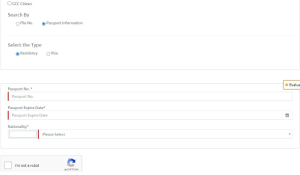
- Once the page opens, navigate to “passport information.” If you are already in the UAE or hold a residency visa,
- check via residency. If you are a first-time visitor or on a tourist visa, check with the visa section.
- On the next page, you will be required to provide your passport number.
- Please enter your passport number in the designated field.
- After entering your passport number, you will also need to provide the date of expiry for your passport.
- Once you have entered this information, you will need to select your nationality. Please disregard the code provided, as it will be fixed after you have selected your country of origin. In my case, I selected Ghana, and the code “319” automatically appeared.
- Make sure to check the box labeled “I am not a robot” and then proceed to click on the “search” button.
Since I clicked on the visa option, it indicates that I am a resident visa holder. My file number is “—–” and my Emirates ID number is also provided. The status of my file has been converted to resident, indicating that I am a resident of the country. This file will expire on June 20th, 2021.
As I am already a resident of the country,
When Canceled Visa Status
when I canceled my previous company, I was given a grace period from April 21st until June 20th to exit the country. However, since my status has been converted to residency, my visa remains valid.
Let’s suppose if I cancel my visa from my previous company then in the status it will show me the exact date to exit from the country.
Now, if I return and check my passport, select residency, and verify my passport number again, as well as my passport expiry and country of original nationality, I can check this box and search. Since I am a resident, this is the information that appears: my file status is active. Previously, my file status was converted to resident, but now it states active. The file was issued on May 4th, 2021, and will be valid until May 3rd, 2024. So, I am still here and my stay is valid. I am not an illegal immigrant. My stay here is valid and I can stay for as long as I want.
I hope you understand. This is how you check the status of your visa, whether it is genuine or fake. If it is not a valid visa, trust me, your file status will declare that or tell you whether it is valid or not. This is how you go about checking your UAE visa.